 rhun
rhun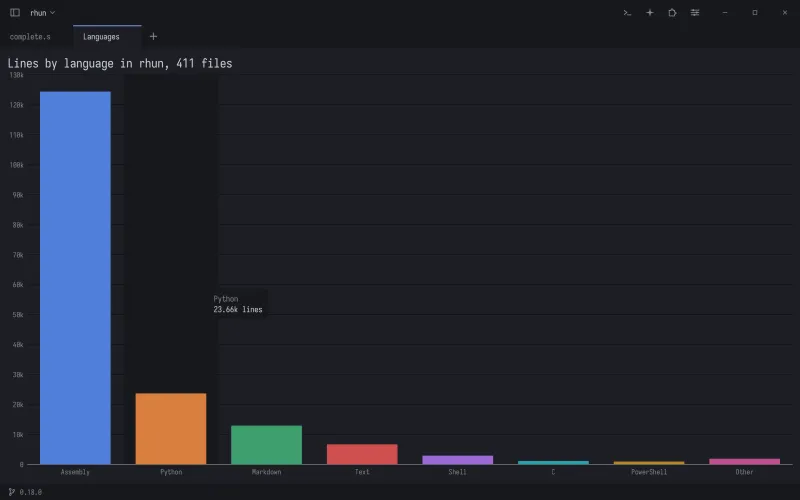
Install an extension
Click the puzzle piece in the title bar and choose Install from GitHub…. Type the extension's owner/name, for example rhun-editor/lsp, or paste its repository's URL.
Or pick one on the Extensions page's Browse list, or in the catalog: those versions were reviewed for the rhun extensions index.
rhun downloads the latest release for your system and checks its checksums. Before anything runs, it shows what the extension may do, such as read or change the files you have open, read your project, or run named programs, and asks you.
The Extensions page turns each one on or off, pins its badge to the title bar, shows its settings and its log, and removes it.
The palette also searches each command's qualified name, owner/name.command. Use that name in your shortcuts when different publishers use the same extension name.
rhun-editor/lsp brings completion, signature help, errors, hover text, definitions, references, symbols, code actions, rename and format from the language servers you already have, such as gopls, rust-analyzer, clangd or pyright.
What they can do
Extensions add commands to the palette with their own shortcuts, edit the open documents as one undo step, mark lines in the gutter with messages, answer hover, open prompts and pick lists, suggest terminal commands, and ship themes and grammars.
They can also open views: tabs they draw in with shapes and text in your theme's colors, such as charts, diagrams and previews, which respond to the pointer. And they provide completion lists and signature help as you type. Press Ctrl + Space for the list and Ctrl + Shift + Space for the signature; Enter or Tab puts the selected item in.
They also answer the language commands: F12 goes to the definition, Shift + F12 lists the references, Ctrl + R lists the file's symbols, Ctrl + . shows the code actions, F2 on a word renames it across files (each changed file opens unsaved, for you to review) and Shift + Alt + F formats the document. An edit across files is checked whole before anything changes.
Enable Format before saving in Settings to use your default formatter before writing. Saving waits within a time limit, then saves the current text if formatting fails. Cancel Save keeps your changes unsaved; Save Without Formatting writes them immediately. Save All and Vim's write commands use the same pipeline.
Code actions before saving accepts source kinds such as source.organizeImports source.fixAll. Matching providers run these actions before formatting, within one total time limit. They can only change the saving document. Save Without Formatting bypasses both source actions and formatting.
Each extension is a separate native program. It starts in milliseconds, a crash cannot take the editor with it, and on Linux and macOS the system holds it to the permissions it declared.
Write your own
Start from the Rust template or the Go template. For C and C++, one header, rhunext.h, does the talking. A template is a working extension with a test that drives rhun and a release workflow that builds Linux, macOS and Windows binaries.
- Name it in
extension.iniand list its commands and permissions. - Write what each command does.
- Run the tests, then tag a version. Anyone can now install it from GitHub.
The protocol is one page: lines of text over the program's input and output.
The 1.1 additions include removing runtime commands when they are no longer available. Extensions negotiate additions before using them.
With a coding agent
Extensions are made to be written by Claude Code, Codex or another agent. The templates carry AGENTS.md, and the rhun-editor/skills plugin teaches the workflow, the SDKs and the tests to pass.
In Claude Code: /plugin marketplace add rhun-editor/skills, then /plugin install rhun@rhun-editor. In Codex: codex plugin marketplace add rhun-editor/skills, then codex plugin add rhun@rhun-editor.
Then ask for what you need, such as “a rhun extension in Rust that charts the size of each folder in my project”. The agent tests its work with the conformance checker, which plays rhun and names every protocol mistake, and with rhun running headless.